What Is a RAG Pipeline? Build an AI Assistant on Your Company Documents
Large language models are brilliant writers but they don’t know your policies, products or past projects — and when they guess, they can sound convincing while being wrong. Retrieval-augmented generation (RAG) solves this by finding the right information in your own documents first, then asking the model to answer using only that information. Here is how a RAG pipeline works and how to build one well.
How a RAG pipeline works
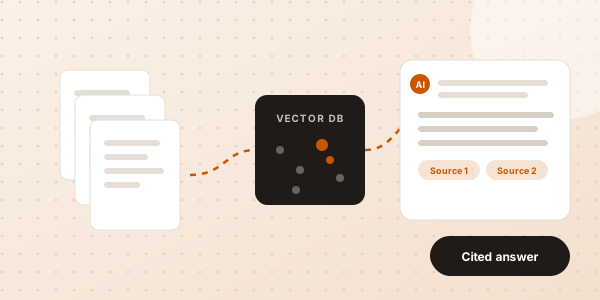
- Ingest: collect documents from PDFs, Word files, wikis, help desks, Google Drive, SharePoint or databases.
- Chunk: split them into small, meaningful passages so the right piece can be found later.
- Embed: convert each chunk into a vector — a numerical fingerprint of its meaning.
- Index: store the vectors in a vector database such as pgvector, Pinecone or Weaviate.
- Retrieve: when someone asks a question, find the most relevant chunks.
- Generate: pass those chunks to the LLM with instructions to answer from them and cite sources.
When RAG is the right choice
- Staff keep asking the same questions about policies, processes or products.
- Customer support needs accurate answers from manuals and past tickets.
- Sales and pre-sales teams search proposals, case studies and specs.
- Your knowledge changes often, so retraining a model would be impractical.
RAG is usually cheaper, faster to update and easier to audit than fine-tuning a model, because the knowledge lives in your documents, not in the model.
Design choices that decide quality
- Chunking strategy: split by headings and meaning, not just character count.
- Hybrid search: combine keyword and vector search so exact terms like product codes are found.
- Re-ranking: re-order retrieved passages so the best evidence reaches the model.
- Metadata and permissions: filter by department, date or access rights so people only see what they are allowed to.
- Citations: show the source for every answer so users can verify it.
- Evaluation: test with a set of real questions and expected answers before and after every change.
RAG and AI agents
RAG answers questions; AI agents take actions. Together they are powerful: an agent can look up the right policy with RAG, then draft a reply, update a ticket or prepare a report. See how this fits into agentic AI.
Build your RAG pipeline with Cardzo
We build secure RAG pipelines and knowledge assistants using Python, LangChain, the OpenAI API and pgvector — connected to your documents and tools, with permissions and citations built in. See our RAG Pipeline & Knowledge Assistant work or get a quote.
Frequently asked questions
Is RAG better than fine-tuning?
For company knowledge, usually yes. RAG keeps information up to date without retraining, shows sources, and respects access permissions. Fine-tuning is better for changing a model’s style or format.
Is our data safe in a RAG system?
It can be. Good RAG systems keep documents in your own database, apply user permissions at retrieval time and use model providers that do not train on your data.
What documents can a RAG pipeline use?
PDFs, Word and Excel files, web pages, wikis, help-desk tickets, emails and database records — anything that can be converted to text.